
Understanding Total Float calculation in Primavera P6
Author : Ayman Mohammed, MSc
In project management, especially when working with scheduling software like Primavera P6, calculating
Total Float is an essential concept for assessing project timelines and ensuring timely project completion.
Let’s break down Total Float and how to calculate it in Primavera P6, using clear steps and visuals.
Total Float refers to the amount of time that a task or project activity can be delayed without affecting the
overall project completion date. It is essentially the “slack” in the schedule, giving flexibility for how long an
activity can be delayed before it starts to impact the project’s finish date.
-
- Positive Float means that the project has extra time before it is delayed.
- Zero Float means that any delay in the task will delay the project.
- Negative Float indicates the project is already behind schedule and delaying the activity further will extend the project’s end date.
How Total Float Works in Primavera P6
Primavera P6 uses Critical Path Method (CPM) to calculate Total Float. The software determines the float for each task based on the start and finish dates, considering project constraints, dependencies, and calendar settings.
Here’s a breakdown of how the Total Float is calculated in Primavera P6:
1. Identify the Project’s Critical Path:
-
- The Critical Path is the longest path of dependent tasks that determine the project’s earliest completion date. Tasks on this path have zero float because any delay here directly impacts the project completion date.
2. Calculate Early Start (ES) and Late Finish (LF) Dates:
-
- Early Start (ES) is the earliest date an activity can begin based on its predecessor’s finish date.
- Late Finish (LF) is the latest date an activity can finish without delaying the project.
3. Compute Total Float:
-
- Under default settings in Schedule options, Total Float is calculated as the difference between the Late Finish date and the Early Finish date of the activity.
Total Float = Late Finish−Early Finish
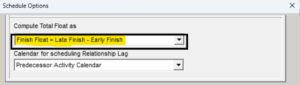
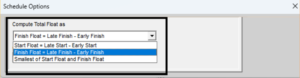
Under the Schedule options, P6 offers computation of Total float based on Start dates as difference of Late Start and Early Start i.e.
Total float = Late Start – Early Start
This third option is to compute the total float as smallest of the Start float and Finish float
To learn more about Primavera P6 and scheduling, follow us on Linkedin